| |
 |
Active Directory and NTLM Authentication |
|
|
| Enterprise Users |
|
|
In large organizations with potentially thousands of users, it makes every bit of sense to have a central directory were all resources are stored. These resources could be printers, computers, servers and even user accounts. Microsoft's Active Directory is one such directory system that can manage these resources.
BlackMoon FTP Server can save you the hassel of maintaining a separate FTP account system and integrate with your central directory like Active Directory. Instead of manually going into the FTP Server to create a user account for each and everyone one of your possibly 3000+ users, you can just create one "Integrated OS Account" in BlackMoon. Think of this integrated OS account as a template for your Active Directory users. This template allows you to specify where the Active Directory Server is located, whether to retrieve the user's home directory from the Active Directory server or to create one for the user. You can also set various FTP related options like allowed login times, bandwidth control, scripts to execute and more.
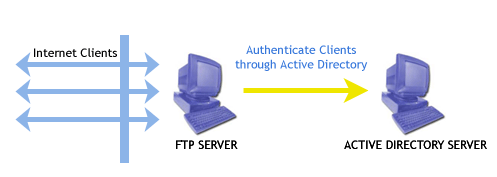
The picture above is a conceptual view of how the authentication occurs. When the ftp client sends a username and pasword, the ftp server looks up the settings in the "Integrated OS Account" template and asks windows to handle the authentication with the Active Directory. If successful the FTP Server retrieves the user settings from the OS (home directory, folder permissions etc) and creates a login based on the "Integrated OS Account" template.
|
|
| |
|
|
|